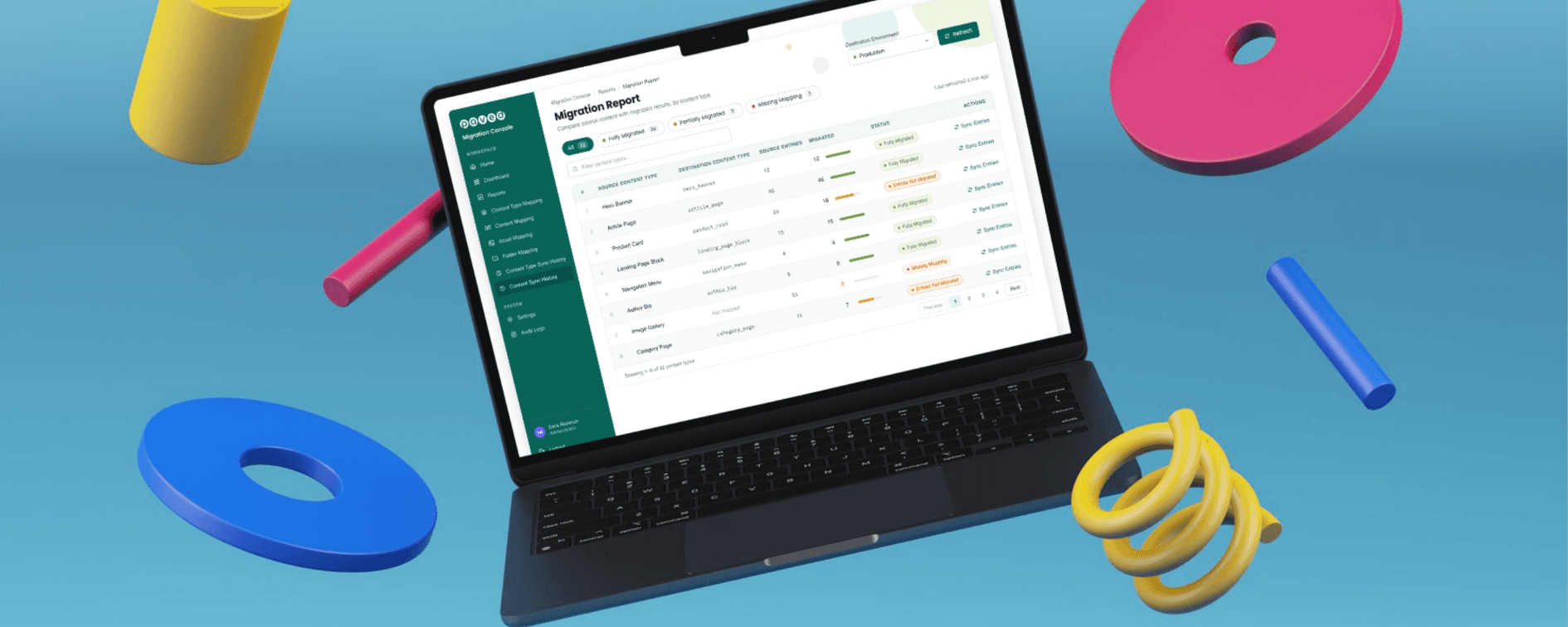
What it is: a migration tool we’ve built and refined across multiple CMS migrations, designed to work between any CMS, in any direction.
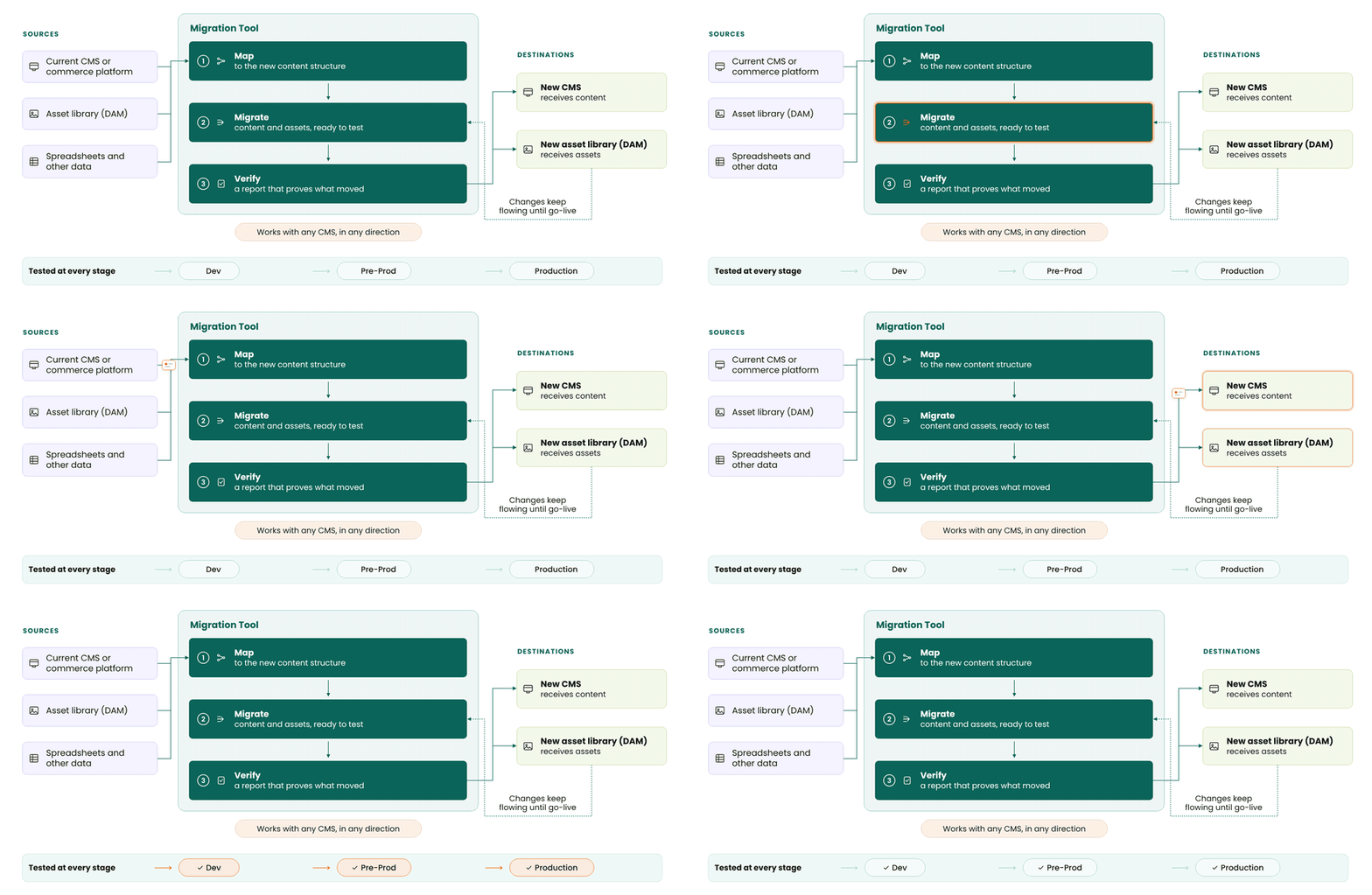
How it works: it maps content to the new structure, migrates it, and syncs changes across environments right up to go-live.
What makes it different: a migration report that proves what moved, entry by entry, so testing starts in week one instead of the final weeks.
Where AI fits: it helped us build the tool’s interface faster, so our team could focus on the mapping decisions that need human judgement.
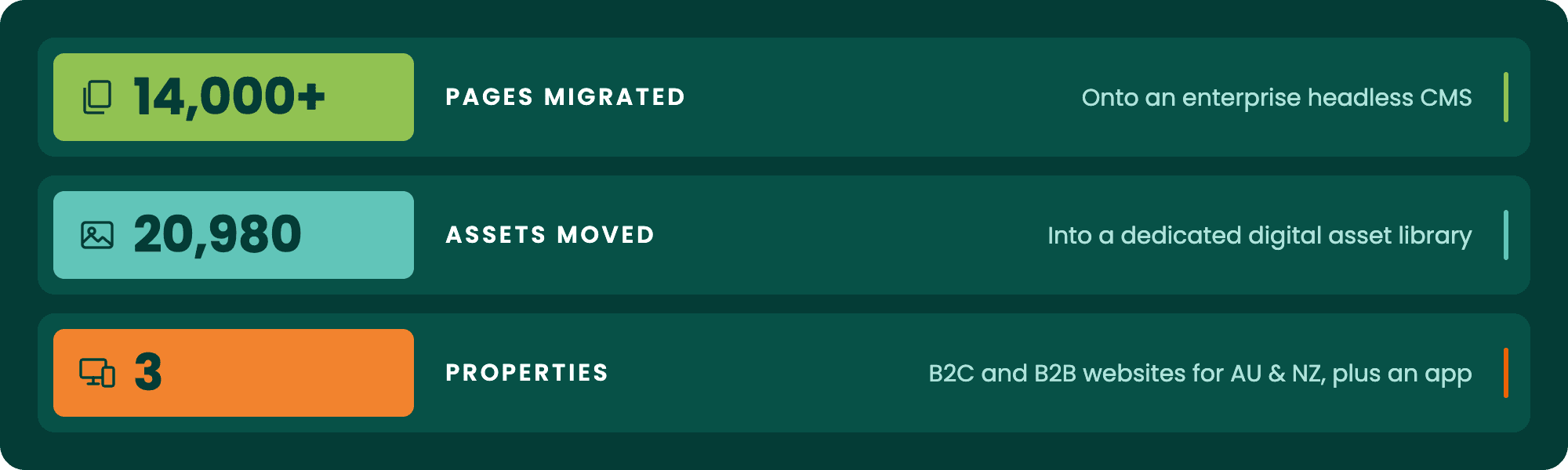
Proven at scale: it recently moved more than 14,000 pages and 20,980 assets across three properties, in one of Australia’s most complex CMS migrations this year.
Here’s how the tool works, and what it could mean for your next migration.
Every enterprise CMS migration comes with its own challenges, but some test a team more than others. We recently delivered what is possibly the most complex CMS migration in Australia this year. It covered three properties: a B2C website, a B2B website and an app, with both websites serving Australia and New Zealand. More than 14,000 pages moved onto an enterprise headless CMS, and 20,980 assets moved into Bynder Digital Asset Management (DAM). All of it had to happen with no room for downtime.
And like most migrations we run, it was never just a like-for-like move. Thirty minutes into almost every conversation, it becomes clear that clients want more than their old site on a new platform. A migration is the best chance in years to fix what's been holding a site back, so the wish list usually includes:
Cleaning up outdated content
A better editing experience in the CMS
Stronger on-page SEO and richer technical SEO, like structured data
Faster performance and better Core Web Vitals
Data tracking that sets the site up for future enhancements
Most clients worry about three things: the timeline, the cost, and the risk of disrupting the business. A platform shutdown deadline only adds to the pressure. Our migration tool takes that pressure off. Mapping still needs a person's judgement, but once it's set, the tool handles the rest, so a lift and shift doesn't eat up time and budget it doesn't need to. That's time our team puts back into the improvements that make the new site better than the old one. We've built and refined the tool across multiple migration projects, and it grows more capable with each one. It now works across different scales and with different platforms, headless CMS or not. AI also helped us extend its interface faster than a from-scratch build normally allows.
That's part of how our engineering team works now: reaching for AI where it speeds things up, not because it's trendy.
At small scale, moving content between platforms is tedious but manageable: copy, paste, check, repeat. At enterprise scale, it isn’t. This migration meant untangling content that had grown flat and messy over the years, splitting assets between the new CMS and a separate DAM, and pulling in product data that had never lived in the CMS at all, while keeping development, staging and production in sync throughout the build. With that much moving, every manual step is a chance for something to slip. A reference goes missing, or an asset never makes it across.
It’s tempting to think a script, or even an AI tool, could handle all of this. But volume is only part of the challenge. Every CMS structures content differently, and each has its own best practices for content models. A single entry in one platform might need to become several linked components in another. Without knowing both platforms well, it’s hard to write the right migration script. It’s just as hard to tell an AI tool how the content should move.
That’s where our experience comes in. Because we’ve implemented so many CMS platforms, we know not only each one’s best practices but also where they overlap and where they quietly differ. We paired that knowledge with thorough documentation from Discovery to build the migration tool. The decisions about structure follow how each platform works best. Then the tool takes on the manual, repetitive work at scale.
At its core, our migration tool isn’t tied to any one platform. Its source and destination connections are configurable rather than hard-coded, so the mapping engine, the sync logic and the audit trail work the same way whichever two platforms are involved.
The tool connects to each platform through its API. Pointing it at a different source or destination means updating those connections, not rebuilding the tool. So it works in any direction, between Optimizely, Adobe, Contentful, Storyblok, Contentstack and more.
That matters whether you're:
Moving a large content library onto a more flexible platform
Consolidating multiple brands or regional sites into a single CMS
Replatforming against a fixed deadline, like a rebrand or product launch
The pattern holds in each case: map it, migrate it, test it environment by environment, and prove what moved.
What changes from project to project is the content itself. Every client’s content structure is shaped by years of their own decisions, which is why every migration starts with Discovery. Before anything moves, we audit the existing content, learn how the client’s team actually works with it, and document what the business needs the new platform to do. That documentation becomes the blueprint for configuring the tool, so the migration fits the client’s content instead of forcing it into a template.
For this project, that meant configuring the tool around a content structure that had grown flat and tangled over years of ad hoc changes, and it changed how the project ran. Testing that would normally happen once, right before launch, started from the first week of the build. The tool handles:
Content type, field, asset and folder mapping between the source and destination platforms
Multi-environment support, with delta syncs that carry content changes through build, UAT and go-live, so testing happens continuously instead of once at the end
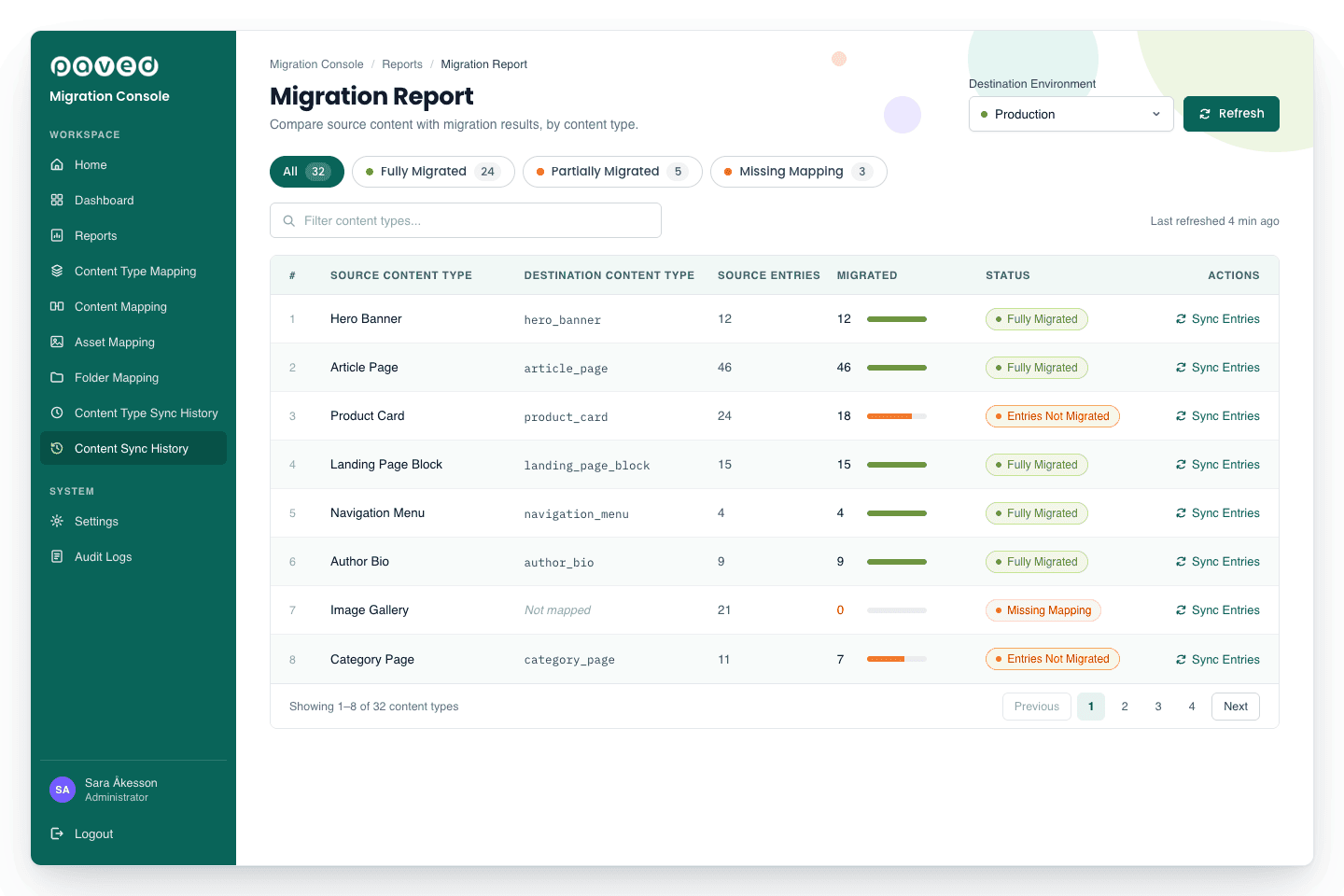
Audit logs and a migration report that compares what existed in the source system against what landed in the destination, content type by content type
That last point matters as much as the migration itself. A content type arrives fully migrated, partially migrated, or is missing a mapping altogether, and the report shows exactly which. That turns "we think it worked" into something the team can verify, entry by entry, before go-live.
The impact showed up in how the project actually ran. Testing happened continuously from early in the build instead of being crammed into the final weeks. Migration status was something the team could point to and prove, not just claim. And because problems surfaced early, in dev and pre-prod rather than at go-live, the project moved through UAT and launch without the last-minute scramble that usually comes with a migration this size. For the people funding and signing off on the project, that meant status updates backed by a report instead of a best guess. And when all three properties went live, the migrated content and data came across without a single issue.
AI is part of how we build now, but only where it actually moves the needle for a client. For this tool, that meant using v0, an AI tool that generates interface code, to get a working prototype of the dashboard together in days instead of weeks. That freed up time for the part that needed human judgement: mapping a messy content structure onto a cleaner one, with no room for error.
Tuong Doan, the engineer who built the tool, put it plainly:
AI tools like v0 aren’t replacing developers. They help us move faster by generating the boilerplate UI, so we can focus on business logic and integrations.
That’s the principle behind how we use AI: let it handle the slow, repetitive parts of a build, and put the time it frees up into the work a client is actually paying for. On this project, that meant delivering the whole wish list, not only moving content. Editors got a better editing experience and could manage redirects and indexability themselves. The new sites gained stronger on-page and technical SEO and faster performance. And data tracking was in place from day one, ready for personalisation and experimentation.
AI doesn’t stop at how we build, either. On migration projects, we can also bring AI into the client’s content workflow. It helps marketers generate and optimise content and improve how that content performs in search and AI-generated answers.
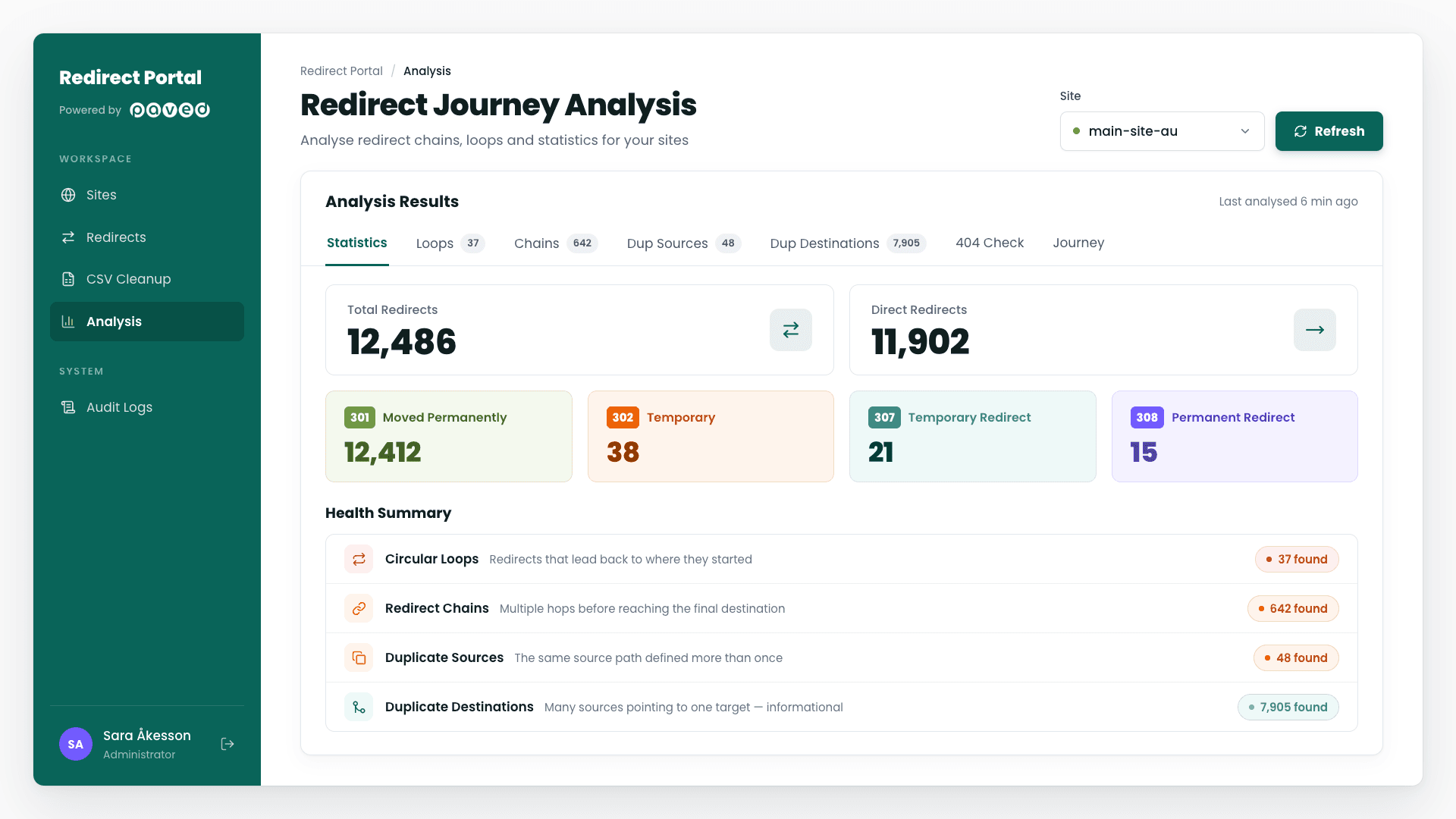
Moving content is only half the job. The other half is making sure every old URL still lands somewhere useful once the content has moved. On an enterprise site, that can mean thousands of redirects, and most CMS platforms aren’t built to manage them at that volume.
When redirects live inside the CMS, editors struggle to find, filter and fix them. There’s no way to see the full path a URL takes, and nothing stops loops, duplicates or chains from building up. Changes can also be slow to take effect. Each of those gaps is a chance for a 404, and every 404 chips away at search visibility.
So alongside the migration tool, we run a dedicated redirect management tool that sits outside the CMS altogether. It’s a Next.js portal where editors manage redirects themselves, without a developer and without touching infrastructure. Redirects run at the CDN level, on Cloudflare or Netlify, so they take effect independently of content publishing. It includes:
CSV import with a built-in cleanup check that catches duplicate sources, self-redirects, missing URLs and inconsistent trailing slashes before import, with Auto Fix to correct them automatically
Chain and duplicate detection, plus bulk 404 checks, so broken paths get caught before search engines find them
A Journey Visualizer that shows every hop a URL takes from its source to its final destination
Audit logs, Microsoft SSO and Editor/Admin roles, so every change is traceable and deletions need a typed confirmation
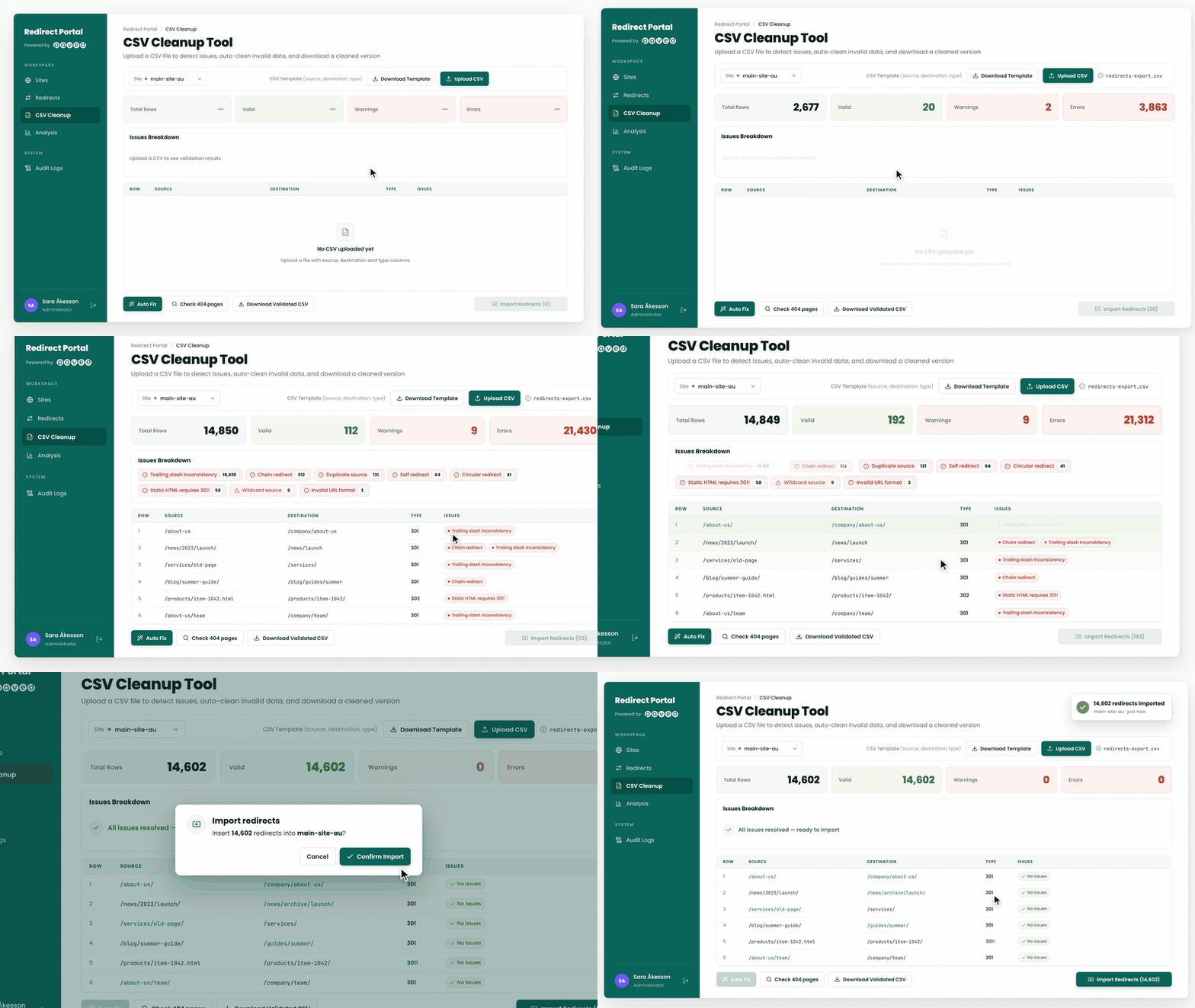
For the business, that means the traffic and rankings the old site earned carry across to the new one, instead of quietly leaking away after go-live.
This project needed more than content moved from one platform to another. It needed a team that understood both platforms, knew what the business wanted from the new one, and could work out the right way to get there. That’s how we approach every project: we’re a technology agency with a business mindset.
We start with what fits the client best, not what’s most impressive to build. Sometimes that’s an existing product, or configuring what’s already there. When a project calls for more, we don’t hesitate to go further. That’s why we build our own tools when nothing off the shelf will do, like the migration and redirect tools behind this project.
Whatever the solution, clients working with us can usually count on:
A clear understanding of their business, built in Discovery before any decisions about the build
Delivery they can see and verify, backed by reports instead of best guesses
More than what’s on the brief, from SEO and performance to tracking that supports future growth
A team ready to own the platform after launch, with training and hypercare support
Migrations are only one part of what we do. Our team works across CMS, ecommerce, analytics and experimentation platforms, for everyone from national brands to member-based industry bodies. Recent work ranges from publishing our own app on the Adobe Commerce Marketplace to turning a simple login page into a full learning hub for AWEX’s WoolClip training site. Whatever’s next on your roadmap, we’ve got the experience to take it on, and the mindset to find the solution that fits.
If you’re planning a CMS migration and want more than a like-for-like move, see how we approach large-scale CMS migrations or get in touch and let's talk about what we'd build for you.