Optimizely CMS 13 launched on 31 March 2026. If you're running CMS 11 or 12, you've likely seen the announcement. And if you're like most of the teams we work with, your first question isn't "what's in it" - it's "what does this mean for us, and do we need to do anything right now?".
CMS 13 is a significant release with real value, but it's not a simple upgrade, and the timing decision isn't the same for everyone. As an Optimizely partner, here's how we'd walk you through it.
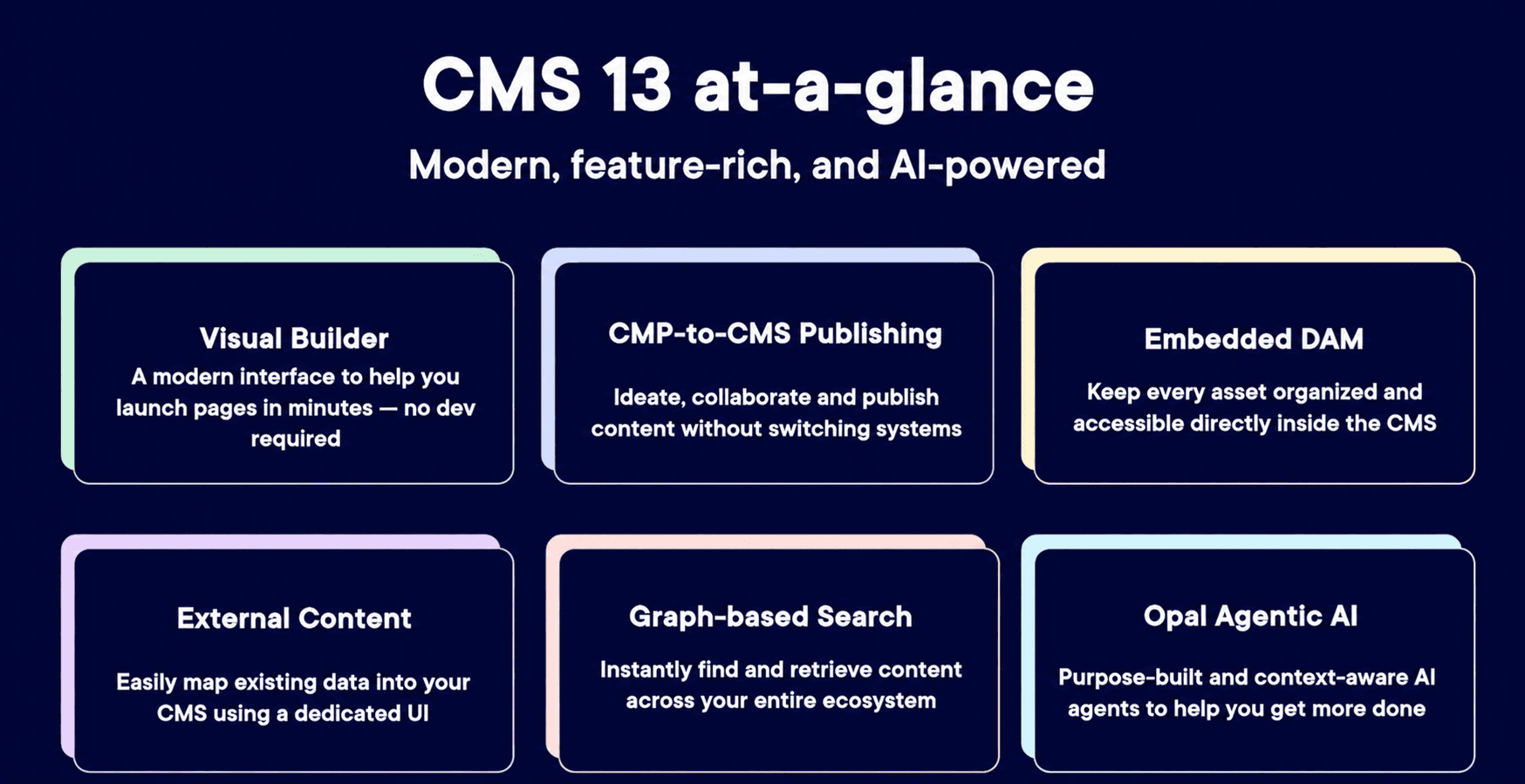
This is not a minor version bump. CMS 13 is built on .NET 10, Microsoft's latest Long Term Support framework, and it shifts how Optimizely handles content creation, delivery, and discoverability.
The headline changes in this release:
Visual Builder introduces a new editing experience that works alongside traditional on-page editing. Businesses choose which pages to transition and when.
Optimizely Graph is now the core content delivery layer. Search and Navigation (Find) is not supported in CMS 13.
Embedded DAM is included in the standard licence.
Opti ID is now the required authentication method for editors and administrators.
Opal AI is available as an opt-in addition - it is not switched on automatically.
These changes reflect a clear platform direction: headless delivery, content at scale, and AI-assisted workflows. Whether your organisation is ready to use all of that today is a separate question.
What changes for content teams
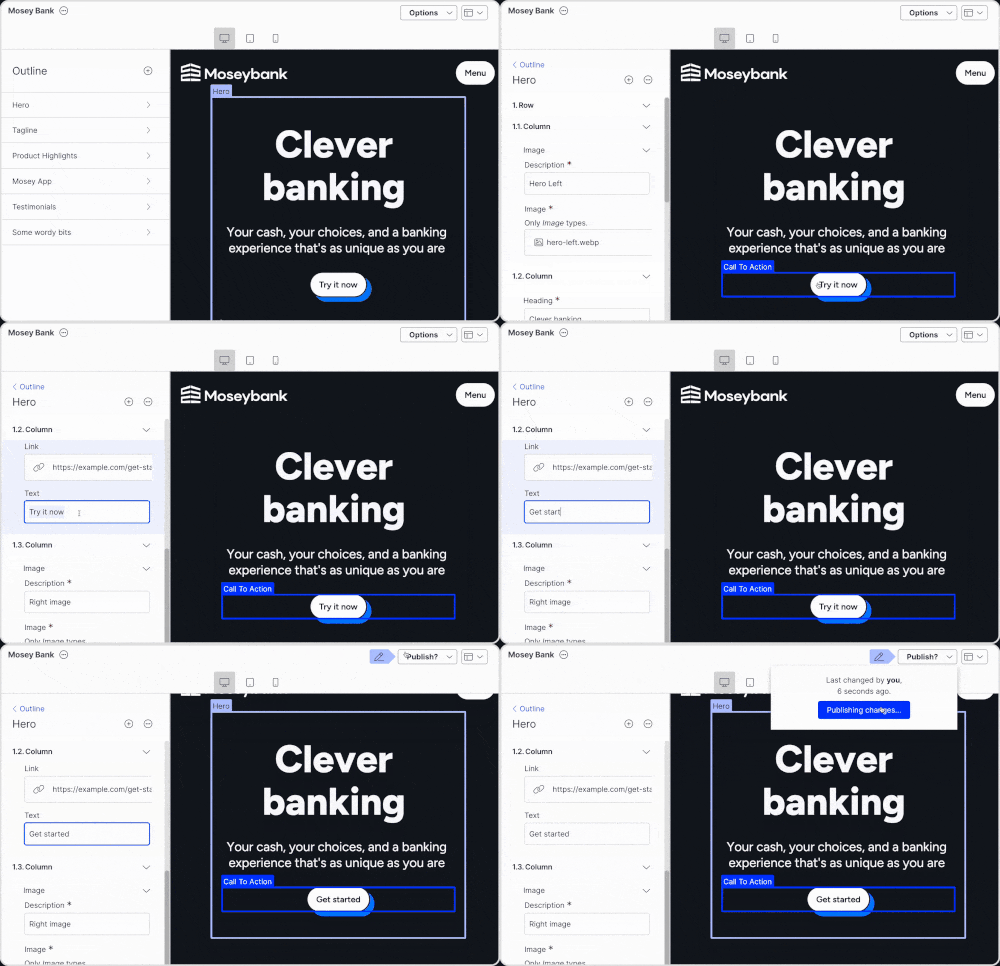
The most visible change for day-to-day users is Visual Builder, which adds a new environment where editors can build pages, manage blocks, preview across devices, and publish without raising a dev ticket.
One thing worth knowing upfront: Visual Builder is optional at the point of upgrade. Existing pages and blocks from CMS 12 continue to work as they are. Teams can move to the new interface at their own pace, which removes the pressure of a hard cutover.
CMS 13 also introduces:
Content Manager: A search-first interface for finding and managing content across large libraries, including external sources like a connected DAM or commerce system
Content Variations: Multiple published versions of the same page, each with its own publishing lifecycle, designed for testing and personalisation
Auto-translation that preserves page structure including content areas and blocks, which saves significant manual effort for teams managing multilingual sites
In our experience, content teams tend to pick up Visual Builder quickly once they see the live preview in action. The shift from a traditional page tree to a grid-based layout takes a small adjustment. For pages where marketing teams manage content day to day, the independence it creates is a genuine win. That said, not every page type is a candidate for Visual Builder. For pages like product listings where tighter editorial control matters, teams often choose to keep the traditional approach. It is a governance decision as much as a technical one.
On Opal AI: it deserves its own mention because there's a lot of noise around it.
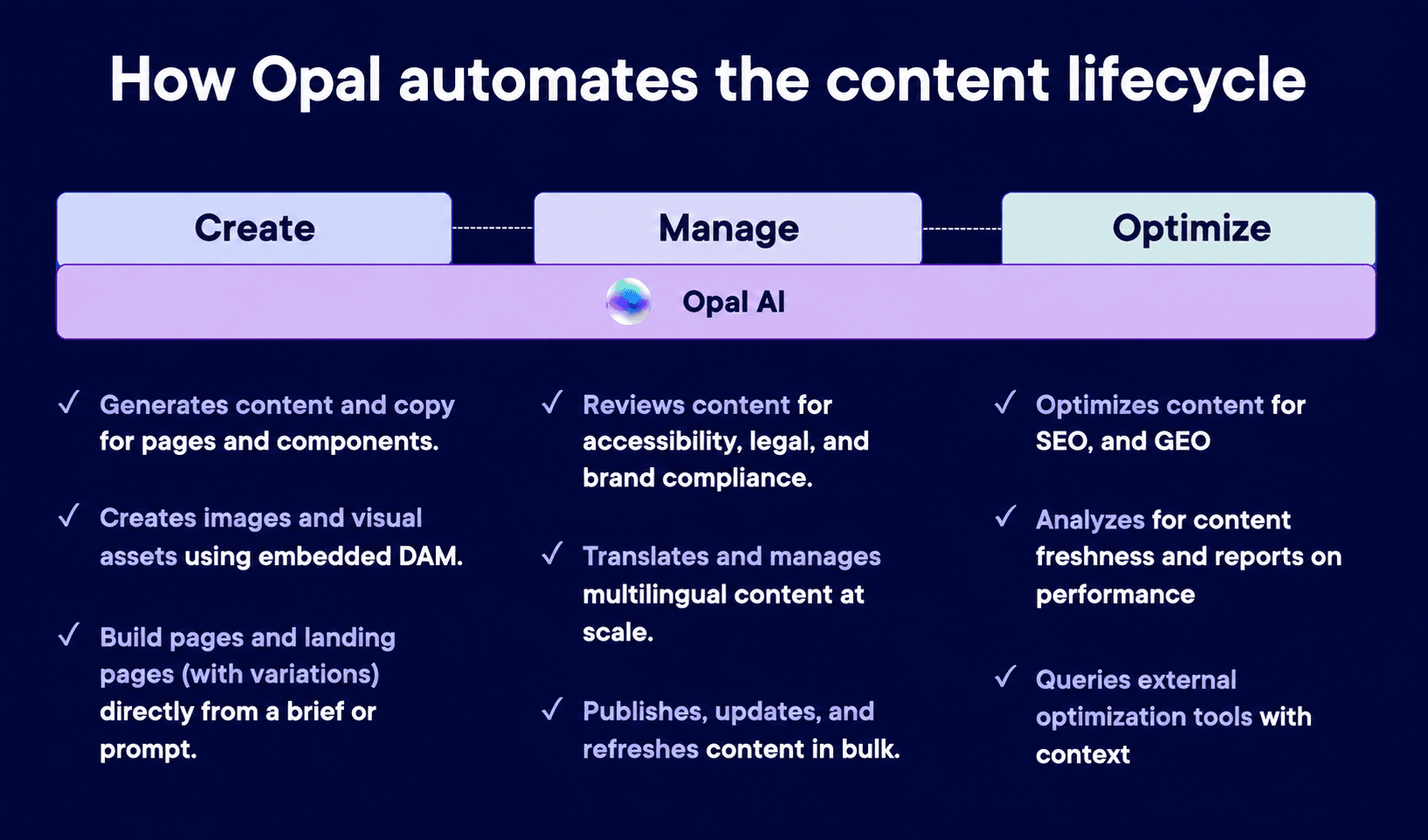
Opal can generate content and copy, review pages for brand and legal compliance, translate multilingual content at scale, and optimise for both SEO and GEO. It operates across the full content lifecycle.
What it isn't: Automatic. Opal requires a separate provisioning process and runs on a credit system. It won't appear in your CMS until your organisation actively enables it. For teams with AI firmly on the roadmap, it's a strong reason to move sooner. For teams that aren't there yet, it doesn't need to factor into the upgrade decision right now.
The .NET 10 upgrade is the foundational change. It brings better performance, improved security, and keeps the platform on a Microsoft-supported framework. That last point matters more than it sounds - we'll cover timing below.
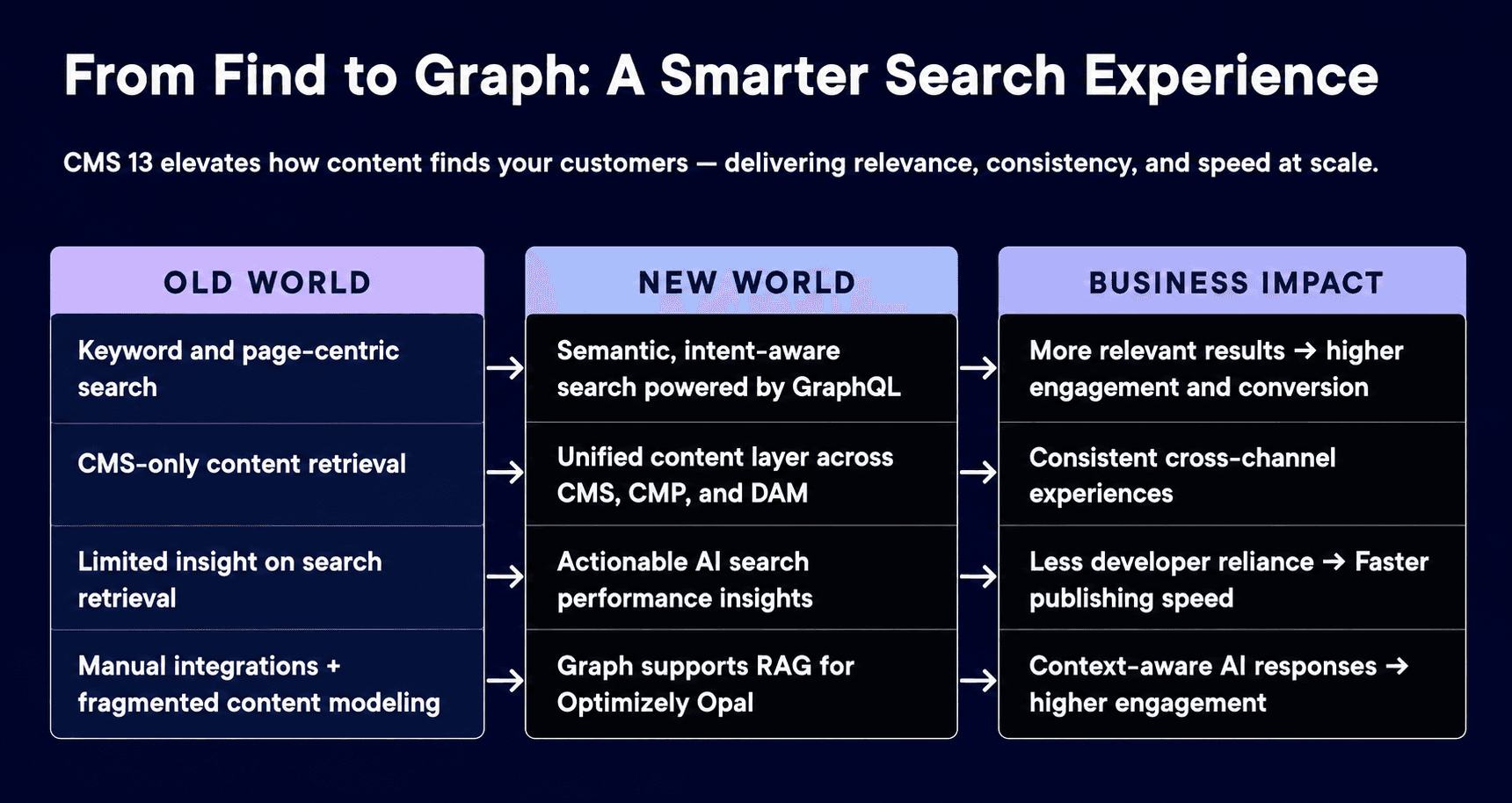
The other key shift is the move from Search and Navigation (Find) to Optimizely Graph. This is mandatory. Find is not supported in CMS 13. Graph handles content retrieval, powers the new Content Manager, enables semantic search, and provides the data layer Opal needs to function properly.
The practical upside: your existing site templates and frontend code do not need to be rebuilt. The migration is about updating how content is fetched and delivered, not redesigning the site from scratch.
One dependency worth flagging early: if you're running Optimizely Commerce, Commerce 14 is not compatible with CMS 13. An upgrade to Commerce 15 is required alongside it.
From what we've seen across implementations, the Graph migration benefits most from early planning. It touches search, content retrieval, and in some cases custom integrations. Teams that map their existing setup before the upgrade begins tend to move through it more smoothly than those who treat it as a last step.
CMS 12 is not end-of-life. Optimizely has not announced a formal end-of-life date, and critical security patches continue. There is no pressure to move immediately.
That said, there is a real timing consideration for CMS 12 clients. .NET 8, which CMS 12 runs on, reaches end-of-support from Microsoft in November 2026. Staying on an unsupported framework is a risk most organisations will want a plan for. If you're on CMS 12, the upgrade conversation is worth starting now, even if the work itself sits six to twelve months out.
For CMS 11 clients, the framework timing is less pressing, but the gap to CMS 13 is wider, so lead time matters more.
The upgrade itself is not a small project. Enterprise implementations typically run between two and six months. Most of that time goes into the Graph migration, identity setup, and content modelling changes for teams adopting Visual Builder. Starting early gives you options. Starting late means making decisions under time pressure that deserve proper thought.
The right timing depends on your current version, your stack, and what you want to unlock. If you're not sure where you sit, that's exactly the kind of conversation we have with teams regularly.
If you're new to the platform or moving from another CMS, CMS 13 is the version to build on. It's current and designed for where content management is heading.
If you're not yet familiar with what headless delivery means in practice, this guide covers the difference between traditional, headless, and hybrid CMS and how to choose between them.
On licensing, the key distinction to get clear on early:
Included in the standard CMS 13 licence: Optimizely Graph, Embedded DAM, Opti ID
Separate and optional: Opal AI, which has its own provisioning process and credit model
Getting this clear before scoping means you build on what you need, rather than finding gaps later or budgeting for capability you're not ready to use.
If you're on CMS 11 or 12 and working through what this release means for your roadmap, or if you're evaluating Optimizely for the first time, the best next step is a conversation about your specific setup.
Paved Digital is an Optimizely partner with experience across implementation, upgrade planning, and digital strategy. We work in this platform every day, which means we can give you a clear picture of what the right path looks like for your organisation - without the guesswork.
Get in touch and we'll take it from there.
Is CMS 12 end-of-life now that CMS 13 has launched?
No. Optimizely has not announced a formal end-of-life date for CMS 12, and critical security patches continue. That said, new feature development is focused on CMS 13, and CMS 12 runs on .NET 8, which reaches Microsoft end-of-support in November 2026. There is no panic required, but having a plan in place is sensible.
Is Opal AI automatically included with CMS 13?
No. Opal is opt-in and requires a separate provisioning process. It runs on a credit system and will not appear in your CMS environment unless your organisation chooses to activate it.
Do we need to migrate to Optimizely Graph as part of the upgrade?
Yes. Search and Navigation (Find) is not supported in CMS 13, so migrating to Optimizely Graph is a required part of the upgrade. Graph is included in the CMS 13 licence. Your existing site templates and frontend code do not need to be rebuilt as part of this - the migration is focused on how content is fetched and delivered.
How long does a CMS 13 upgrade typically take?
Enterprise upgrades typically run between two and six months, depending on the complexity of your implementation. The main effort sits in the Graph migration, Opti ID setup, and content modelling changes if you are adopting Visual Builder. Starting the scoping conversation early gives you a clearer picture of what is actually involved.
Can we run CMS 12 and CMS 13 in parallel during migration?
Yes. Optimizely supports parallel environments to allow for thorough testing and validation before production cutover. This is particularly useful during the Graph migration, where you will want to confirm search parity before switching over.