If your organic traffic report looked worse this month even though nothing dropped in rank, you're not imagining it.
AI Mode is now the default Google Search experience, with AI Overviews as a key feature within it, and that shift is quietly rewriting what "impressions," "clicks" and "position" actually mean. We've had more than one client ask us this month why a keyword sitting at position 1 is sending less traffic than it did last year. Here's what actually happened in Q3 2026, and what we're telling clients to do about it.
Now that AI Mode is the default Google Search experience, your SEO metrics are all changing. You may never see any organic or AI referral traffic to your site but people are still reading about you.
Google's official documentation on impressions, position and clicks hasn't changed, but it now spells out how AI Overview and AI Mode fit into those same three metrics. Worth knowing, because most people are still reporting on AI-era search with pre-AI assumptions:
Clicking a link to an external page inside an AI Overview counts as a click, the same as any blue link.
An item shown inside an AI Overview counts as an impression whether or not it was actually scrolled into view, unless it's tucked behind a "show more" toggle.
An AI Overview takes up exactly one slot on the page, and every single link inside it, whether it's the first source cited or the fifth, gets recorded as position 1.
AI Mode plays by a different rulebook: position is calculated the way it is on a normal results page, and carousels and image blocks get the standard position treatment. If someone asks a follow-up question inside AI Mode, that's treated as an entirely new query with its own fresh impressions, positions and clicks.
Google's John Mueller said on LinkedIn:
I expect this will evolve over time, search / AI Mode / AI Overviews evolve too, there are edge-cases; the goal is not a written-in-stone absolute truth for position counting (that's impossible), but rather to make something that's useful for site owners in terms of understanding how their site is shown. We'll update the documentation when / if there are significant changes. It's cool to see these evolutions in search, but it also means there will be some work required on your end when it comes to interpreting, understanding, comparing these metrics.
Our translation: expect more changes, and expect your GSC and GA4 reporting to need active reinterpretation, not just a monthly export.
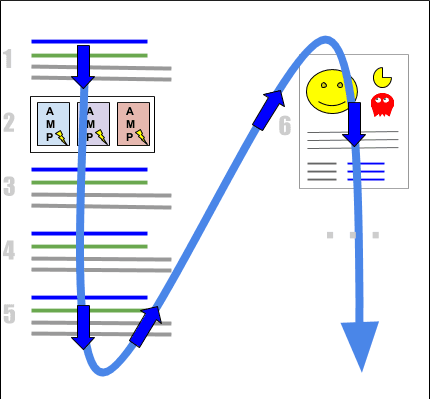
How position is calculated on Google Search Results or AI Mode on a desktop computer
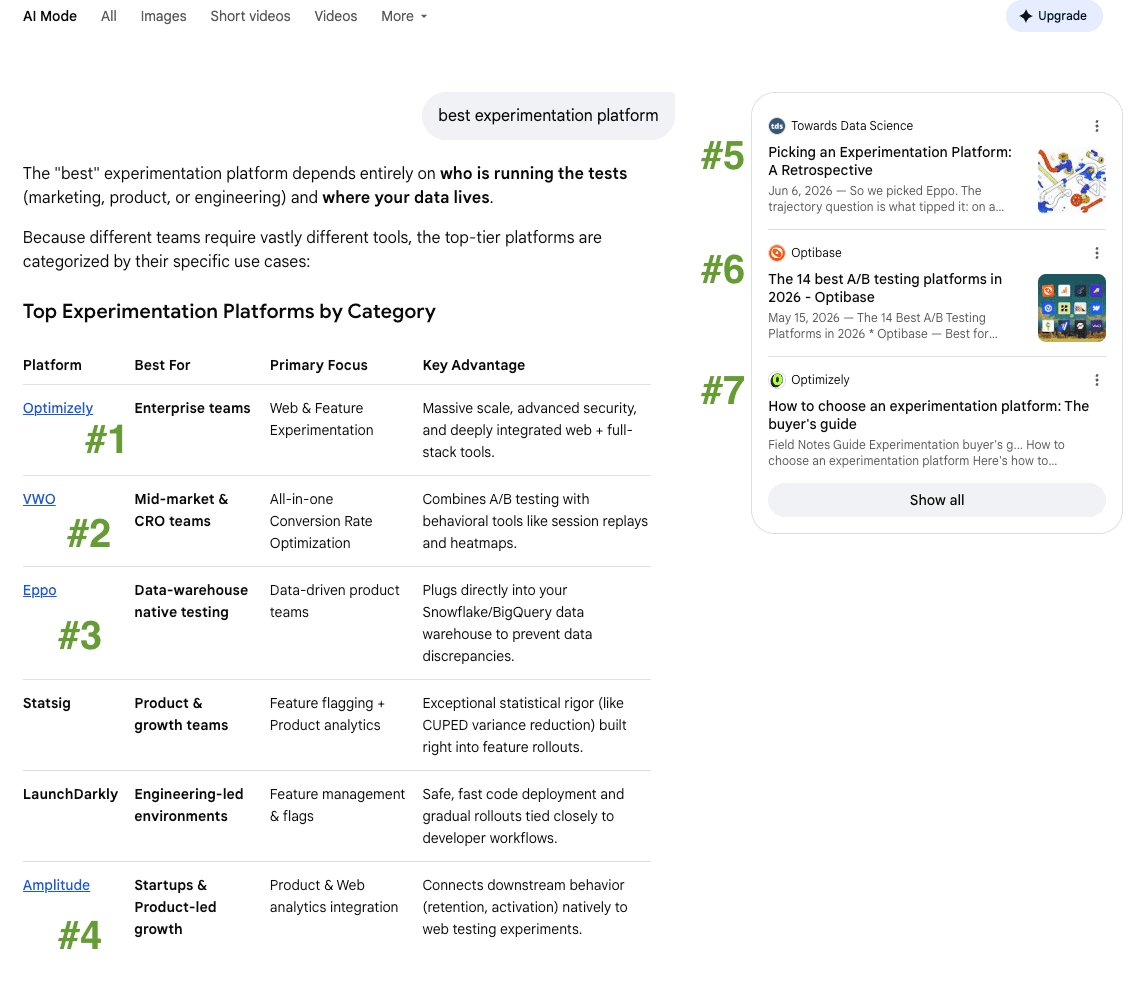
Example position tracking on AI Mode
We're seeing clients with year-on-year drops in organic traffic on their best-performing queries, while positions on those same queries haven't moved. As AI Overviews, Shopping packs and other SERP features keep expanding, clicks and traffic take the hit even when rankings hold.
Position 1 doesn't mean what it used to mean when position 1 is sometimes a wall of AI-generated text sitting above your listing. So if your reporting still leads with clicks and CTR as the whole story, it's time to add a few lines to it:
AI Overview and AI Mode appearance rate, tracked separately from standard organic position.
Impression share without clicks, as being cited or shown inside an AI Overview with zero clicks is still a brand exposure.
Branded search and direct traffic as a proxy for AI-driven awareness, since someone who read about your business inside an AI Overview may search your brand name next rather than clicking through.
This is exactly the shift we mean when we talk about GEO reporting: it's not a replacement for SEO reporting, it's an addition your dashboards probably don't have yet.
Google's holiday-season push this year is all about agentic shopping, and there's a lot for retail and ecommerce teams to action before peak trade.
Google Merchant Center's AI performance insights are now live in Australia, Canada, India, New Zealand and the US (English queries only for now). It shows your brand's share of voice against competitors across three shopping stages: Discovery, Evaluation and Ready to Buy, plus the actual terms, product attributes and search intents customers are using in each stage. That's a genuinely new layer of intelligence: not just how you rank, but how often you're mentioned at all when someone's still deciding what to buy.
Google recommends brands to optimise existing product feed to increase conversions by 5 to 10%, such as to use video link attribute or conversational attributes to add context to your product listings, and to connect loyalty data in Merchant Center so returned users can see member perks and pricing.
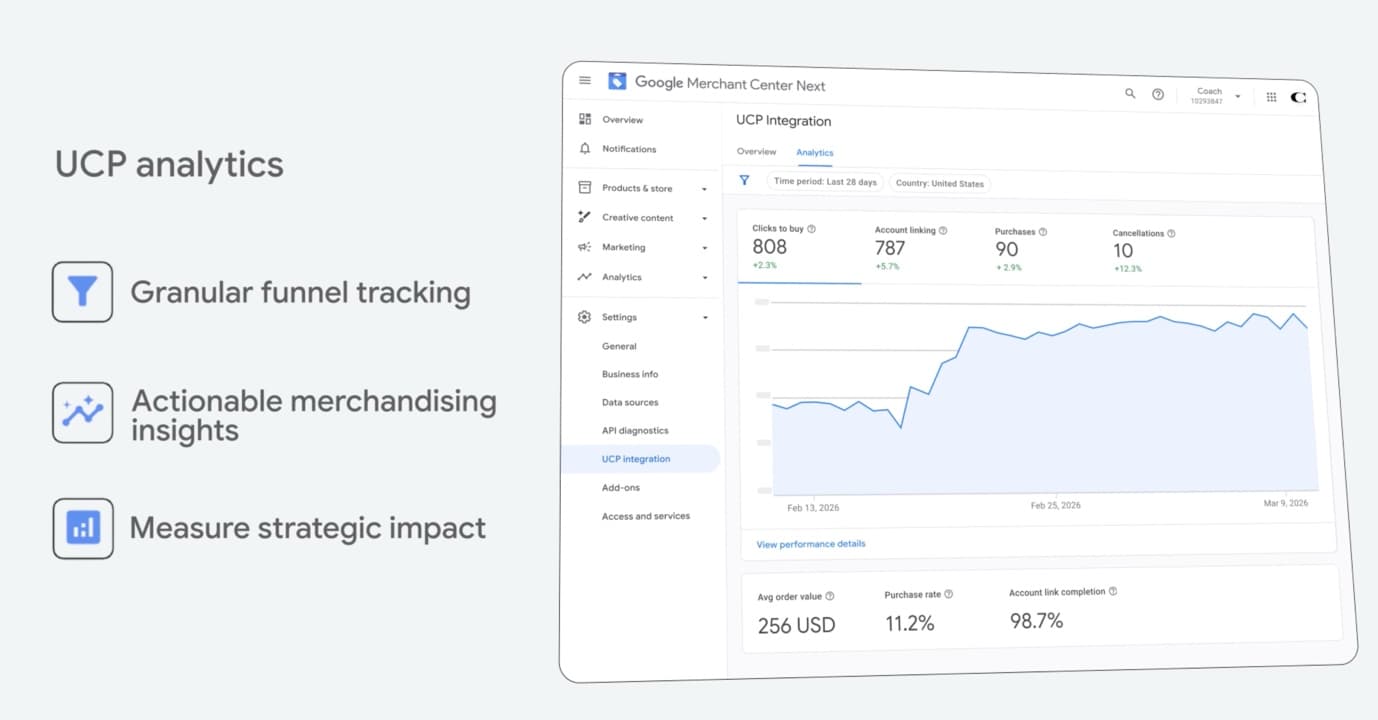
The Universal Commerce Protocol (UCP) is Google's bigger bet: letting AI agents complete a purchase on a shopper's behalf, directly inside an AI surface.
It's in early access for US merchants now, covering checkout, multi-item carts, and account and loyalty linking, with expansion to Australia and Canada upcoming.
The tracking gap is worth flagging clearly: a UCP-powered purchase currently generates no pageview, no session and no event in your usual analytics. If you don't build your own server-side tracking for it, you'll have revenue that your existing reports simply can't see.
And one to watch closely: Google has been testing sending users straight to a merchant's own product page when they click a free product grid listing, instead of the multi-retailer overlay experience. If this rolls out broadly, it changes the game for a lot of retailers relying on that overlay for visibility (Source: X).
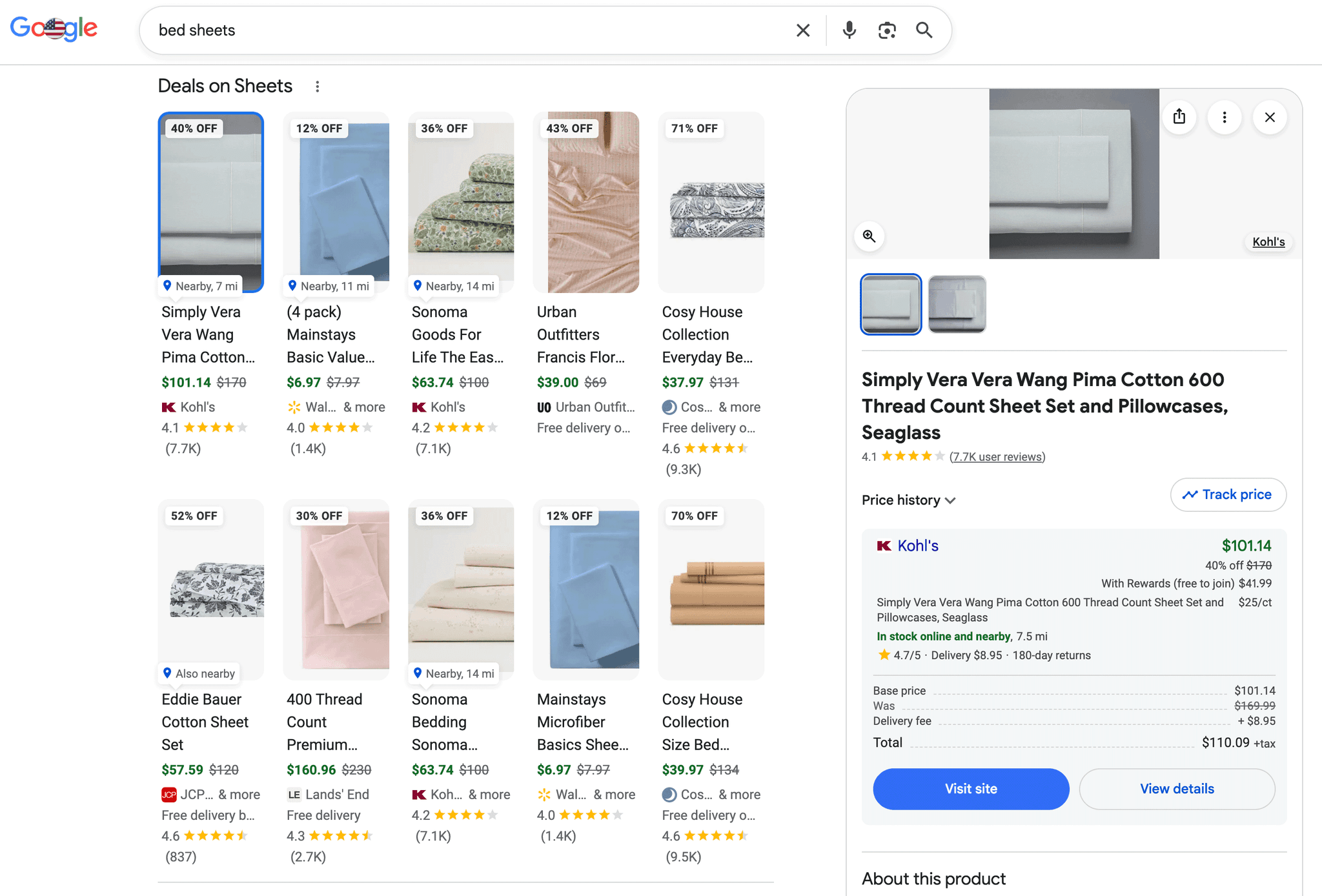
Here's the normal view, but soon clicking on a product would lead to the ecommerce site
Google Search Live now runs on Gemini 3.8 Live, Google's newest AI model. The upgrade brings more natural real-time voice conversations, fluid multilingual support, and web links surfacing on screen mid-conversation. You can point your camera at something, ask questions aloud, and follow up without typing.
AI Mode also added conversation history, so people can pick a search thread back up later. Taken together, the trend is clear: Gemini is steadily becoming the engine under more of Google Search.
Google Chrome User Experience Report (CrUX) announced new ad metrics: Ad Count (the average number of ads in the viewport), Ad Density (the average share of the viewport ads occupies), Ad Weight - Network (bytes ads consume) and Ad Weight - CPU (milliseconds of processing ads cost). Unlike Core Web Vitals, these don't have pass/fail thresholds and are only used for competitive benchmarking.
Google Ads now shows spend benchmarking in Account Overview, comparing your spend against advertisers in a similar position to you, so you can see whether you're over- or under-investing relative to your category before you finalise next quarter's budget.
Multi-source conversions, currently in beta, let a business connect its Google tag to backend data sources like a CRM or CDP. That means a conversion action can finally be matched to an identified customer record in your own systems, giving you real visibility into when, where and how a specific person actually converted, not just a session-based event.
Every one of these updates points in the same direction: less of your audience's journey happens inside a results page, and more of it happens inside a conversation, an overlay or an agent transaction you can't directly see.
That's not a reason to panic, and it's definitely not a reason to keep reporting the old way and hope the numbers recover on their own. Businesses that adapt their metrics now, rather than waiting for Google to hand them a tidier dashboard, are the ones who'll actually know what's working when everyone else is still arguing about why their traffic graph looks wrong.
Paved Digital works with enterprise and mid-market teams across Australia on exactly this problem: building the SEO and GEO reporting that reflects how search actually works today. If your team is trying to make sense of what AI Mode and AI Overviews are doing to your numbers, we'd be glad to talk it through. Contact us >